
📌 Overview
The Mako Core SDK is implemented in C++, while the C# API is provided through a SWIG-generated wrapper layer. This layer bridges managed and unmanaged code, translating calls, types, strings, exceptions, and object handles between the .NET runtime and the native SDK. Although SWIG removes much of the mechanical work, the wrapper must still preserve the ownership and lifetime semantics of the C++ API, particularly for reference-counted objects and resources that require deterministic release.
This page describes that mechanism and how best to code for it. It also covers other C#-isms worth knowing about.
🔧How it works
The Mako C# API uses SWIG-generated proxy objects to represent native C++ SDK objects. Each proxy holds a pointer to the underlying native object and records whether it owns that object. When the proxy is disposed, the wrapper releases the native object only if ownership belongs to that proxy. For reference-counted Mako objects, this typically means releasing the wrapper’s reference; the native object is destroyed only when the final reference is released.
A developer should not expect objects to leak merely because they are using the C# wrapper. The wrapper includes disposal and finalization logic, and SWIG-generated proxies are designed specifically to manage the transition between managed and unmanaged lifetimes. However, relying on the garbage collector alone is not ideal for native resources, because finalization is non-deterministic. Code that creates Mako objects with significant native resources should dispose them explicitly, preferably with using declarations or using blocks, so the native reference is released promptly.
The cases that require care are the same cases that are always delicate at a managed/unmanaged boundary: objects returned as borrowed references, native objects stored by another native object, callbacks/directors, and objects whose lifetime crosses method or thread boundaries. SWIG can manage the common ownership cases, but it cannot infer every possible C++ lifetime relationship automatically; its documentation explicitly notes that C++ memory management is tricky and cannot be handled automatically in every case.
🦈Mako: C++ & C# objects
Mako employs a class factory pattern. A class factory in C++ is a mechanism that creates objects while abstracting away the concrete class type and construction details from the caller. Most Mako objects have a create() method, for example, this is how an instance of Mako’s factory class is created:
const IJawsMakoPtr jawsMako = IJawsMako::create();
The variable jawsMako is a pointer, and so can be treated as a const. It’s subsequently passed in whenever a new class is created, for example:
const assembly = IDocumentAssembly::create(jawsMako);
The equivalent C# code would be:
using var jawsMako = IJawsMako.create();
...
using var assembly = IDcoumentAssembly.create(jawsMako);
In C#, using provides a structured way to ensure that objects holding unmanaged or native resources are disposed of correctly. Traditionally this was written as a bracketed using block, where an object implementing IDisposable is created for the duration of the block and its Dispose() method is called automatically when execution leaves that block, even if an exception is thrown. More recent versions of C# also support a using declaration, where no explicit block is required; instead, the compiler arranges for Dispose() to be called when the variable goes out of scope.
For wrapper objects that represent native C++ SDK objects, this is especially important. Dispose() is the point at which the managed proxy releases its reference to the underlying native object. Although the blockless form can look less explicit, the purpose is the same: to make resource release predictable and tied to lexical scope, rather than leaving it to the timing of the .NET garbage collector.
This makes object lifetime explicit in the source code, even when the compiler is responsible for inserting the disposal logic. In the context of the Mako Core SDK, using using helps ensure that native resources are released as soon as the corresponding managed object is no longer needed. This prevents leaks, avoids holding native objects alive longer than necessary, and keeps the managed C# code aligned with the ownership and reference-counting semantics of the underlying C++ API.
🏭Namespaces and class factories
Mako has two namespaces, JawsMako and EDL. This reflects Mako’s history, a combination of the Jaws rendering technology and the object model of an earlier development known as EDL, or Electronic Document Library.
JawsMako and EDL have their own class factories: IJawsMako and IEDLClassFactory. Depending on the class being created, you will require one or the other. In C++ and C#, you can use your IJawsMako instance everywhere and Mako will redirect as needed. For Java and Python, you must use the getFactory() method of the IJawsMako class to obtain the IEDLClassFactory pointer.
var jawsMako = IJawsMako.create();
...
var fixedPage = IDOMFixedPage.create(jawsMako.getFactory());
🧵Strings
Mako’s C++ implementation pre-dates STL’s std::stringand implements two string types of its own:
-
String- a wide-string type, for exampleString greeting = L"Happy birthday!"; -
U8String- a UTF-8 string type, for exampleU8String greeting = "Happy Birthday!";
The underlying types are wchar_t* and char*, respectively. Convenience methods are provided to convert between the two: StringToU8String() and U8StringToString().
In C#, life is easier. C# strings are consistently the standard, UTF16 and Mako/SWIG marshals string data across the managed/unmanaged divide as appropriate.
For example, C++ classes with methods that take a string will often (but not always) accept either a wide string (String) or a UTF8 string (U8String):
const auto pdfOutput = IPDFOutput::create(jawsMako);
pdfOutput->setVersion("PDF/X-4");
U8String utf8Name = "MyPDF.pdf";
pdfOutput->writeAssembly(assembly, utf8Name);
String name = L"MyPDFToo.pdf");
pdfOutput->writeAssembly(assembly, name);
In C# you don’t need to think about string encoding.
using var pdfOutput = IPDFOutput.create(jawsMako);
pdfOutput.setVersion("PDF/X-4");
string name = "MyPDF.pdf";
pdfOutput->writeAssembly(assembly, name);
🖇️Vectors
Mako’s C++ implementation pre-dates STL’s std::vector and implements a vector type of its own, CEDLVector(). Today the implementation is backed by std::vector, so many of the operations that std::vector supports are also available to a CEDLVector. For example:
CEDLVector<uint32_t> list = { 1, 2, 3 };
for (const auto i : list)
{
  // do something
}
Commonly used vector types such as CEDLVector<uint32_t> have a typedef to a more convenient name. So this code is equivalent to the line above:
CUInt32Vect list = { 1, 2, 3 };
In C#, all the types that could be stored in a vector have specific names, e.g., CVectUint, CVectString, CEDLVectCFrameBufferInfo.
Besides this, there are some differences to C++. To begin with, a CEDLVectXXX must be instantiated with the new keyword:
using var list1 = new CEDLVectUInt(new uint[] { 1, 2, 3 });
You can copy a vector to another:
using var list2 = new CEDLVectUInt(list1);
Where the type is unambiguous, it can be omitted:
using var list3 = new CEDLVectString(new [] { "a", "b", "c" });
The append()method adds an item to an existing CEDLVect:
using var colorantInfo = new IDOMColorSpaceDeviceN.CColorantInfo("Blue", new CEDLVectDouble(new[] { 1.0, 0.5, 0.0, 0.0 }));
using var colorants = new CEDLVectColorantInfo();
colorants.append(colorantInfo);
A point of interest is that CEDLVect does not implement IEnumerable.
A type that implements IEnumerable can be used in a foreach loop, allowing its contents to be visited one item at a time without the caller needing to know how those items are stored internally.
To overcome this, an alternative type that does, StdVect, can be used instead of its CEDLVect counterpart. There is a StdVect… for each CEDLVect… type, e.g., StdVectUint(), StdVectString()and so on. It can be created from scratch, or from an existing CEDLVect, for example:
using var names = new CEDLVectString(new [] { "Peter", "Jane", "Buster" });
using var iterableList = names.toVector();
foreach (var name in iterableList)
{
  // Do something
}
Likewise, a CEDLVect can be initialized from a StdVect. This is useful when a Mako method expects a CEDLVect but the data resides in a StdVect
using var names = new StdVectString(new[] { "Peter", "Jane", "Buster" });
using var cvNames = new CEDLVectString(names);
CEDLVect also support arrays, with toArray() and initialization from an array, as in the above examples.
🧬Object ownership and lifetime
In an example above, we have this code:
using var colorantInfo = new IDOMColorSpaceDeviceN.CColorantInfo("Blue", new CEDLVectDouble(new[] { 1.0, 0.5, 0.0, 0.0 }));
using var colorants = new CEDLVectColorantInfo();
colorants.append(colorantInfo);
It raises the question, “Is this code safe, given that there is an intermediate object involved (in this case, a CEDLVectDouble)? Who owns it, and how and when does it get disposed?”
The answer is that this code is safe from a dangling-pointer/ownership point of view, but the intermediate CEDLVectDouble is not disposed deterministically.
However, this is worth closer examination.
using var colorantInfo = ... only disposes colorantInfo at the end of the C# scope. It does not also call Dispose() on the new CEDLVectDouble(...) argument. That temporary wrapper will instead be cleaned up later by SWIG’s finalizer/Dispose machinery. SWIG’s C# proxy pattern stores swigCMemOwn, calls the generated native delete_... when disposed/finalized, and uses HandleRef to keep proxy arguments alive during the unmanaged call.
For this Mako constructor, that delayed disposal should not corrupt colorantInfowhich reserves its own components vector and appends converted float values. It copies the values; it does not store a reference to the input CEDLVectDouble. Mako’s SWIG interface also ignores the initializer-list overload and exposes the vector-based path, with CEDLVectDouble generated from DECL_VECT_ELEM(Double, ...) and the C# array convenience constructor.
A better way to write this in production, especially in loops, would be:
using var components = new CEDLVectDouble(new[] { 1.0, 0.5, 0.0, 0.0 });
using var colorantInfo =
    new IDOMColorSpaceDeviceN.CColorantInfo("Blue", components);
That gives deterministic cleanup and also disposes components if the CColorantInfo constructor throws. It is not required for correctness in this specific constructor because Mako copies the data, but it is better resource hygiene.
🎣Casting of objects
Mako classes are arranged as a base class from which child classes inherit properties and methods. This inheritance model is shown graphically in the Mako’s online API documentation. Here is the diagram for an IDOMNode:
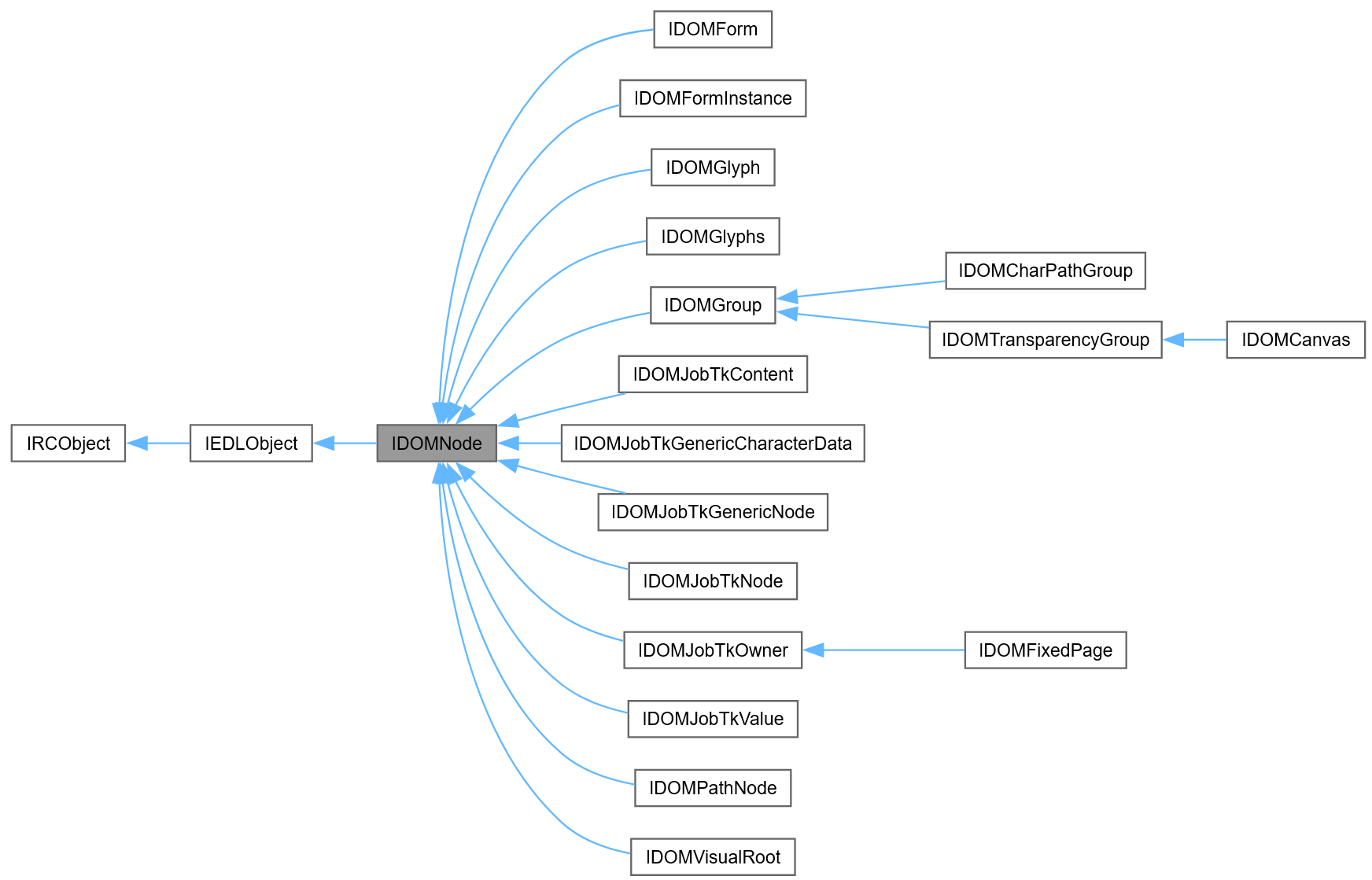
Mako provides methods to ‘cast’ an object to a parent, sibling or child class, to gain access to methods or properties exposed by the alternative class.
In C++ this is handled with macros that simplify the code that’s required. In this example we have a Mako DOM node; if it’s a glyphs node, we can find out whether the overprint flag for the fill is active, but to do this we need to cast to an IDOMGlyphs to access the getFillOverprints() property.
IDOMNodePtr node;
...
if (node->getNodeType() == eDOMGlyphsNode)
{
    if (edlobj2IDOMGlyphs(node)->getFillOverprints())
    {
        std::wcout << L"Glyphs node with overprint fill found!" << std::endl;
    }
}
C# classes have a toRCObject() and/or fromRCObject() methods that together perform the same operation. This is how the above example will look in C#:
IDOMNode? node = null;
...
if (node.getNodeType() == eDOMNodeType.eDOMGlyphsNode)
{
    if (IDOMGlyphs.fromRCObject(node.toRCObject()).getFillOverprints())
    {
        Console.WriteLine("Glyphs node with overprint fill found!");
    }
}
🔲FRect() and related classes (FPoint, FBox, FMatrix etc.)
Mako implements struct-like classes that are convenient for passing geometry or matrix transformations around. A commonly-used example is FRect() that simply expresses a rectangle as four doubles: x, y are the origin and dX, dY are the width and height. Some Mako methods return an FRect, for example IPage->getCropBox(). They are created in C++ like this:
auto myRect = FRect(0, 0, 250.0, 500.0);
auto anotherRect = myRect;
Here, anotherRect is a copy of myRect and distinct from it.
In C#, you will need the new keyword:
using var myRect = new FRect(0, 0, 250.0, 500.0);
using var anotherRect = myRect;
In this case, anotherRect points to the same object. To make a copy, create a new instance, passing in the FRect to be copied:
using var myRect = new FRect(0, 0, 250.0, 500.0);
using var anotherRect = new FRect(myRect);
This applies to similar classes such as FPoint, FBox & FMatrix.