
This is useful procedure for troubleshooting and checking the individual RIP log files for HVD reuse and scanning, other information is also in the log files.
Pre-reqs and assumptions
-
The steps below are for an SPC Evaluation setup
-
Everything is on one Windows 11 PC
-
SPC version 4.11 was used
-
The evaluation is installed and you are able to rip a simple file
Steps
Editing the config
In file explorer make a copy of your device’s configuration and rename it e.g. rename Default - KCMY.sdc to Default - KCMY with logging.sdc

located here
C:\ProgramData\Global Graphics Software Ltd\Smart Print Controller\DeviceConfigs
change the file suffix to .zip

open the zip file and edit the following files within the sdc file:

change the Logging value to a 1
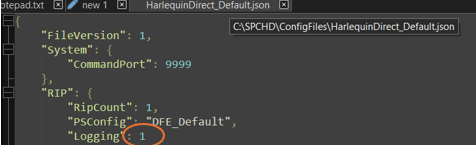
replace all this and replace the file suffix, this creates a permanent logging version of the the default configurations.
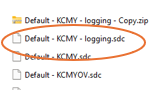
Loading the config into Smart Print Controller
Return to Smart Print Controller and in the Engineer tab click load device
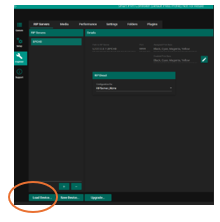
browse to the new version of the sdc e.g (Default - KCMY with logging.sdc) and load the device
Reconfigure and additional parts of the workflow e.g Autotune and re-rip a job
Reading and locating the logs
The log files are now located in as many folders as there are rips:
C:\SPCHD\SWfr-001\LE_LGFLE
Sample of log file
Initial RIP virtual memory: 5 MiB (4784 KiB) used, 3 GiB (3072000 KiB) commit limit, 6 GiB (6144000 KiB) reserved
Ripping file %C%SPCHD/Jobs/92d7d082-87d4-45c7-94fc-0636fc8a9e3a.pdf as PDF.
Starting Job On Tue Apr 15 13:59:54 2025
Loading NamedColor database support version release/S_hqnrip_13_2_r6d.56340 #hqn-final-13.2r6d - Copyright (c) 2003-2017 Global Graphics Software Ltd. All Rights Reserved.
Executing injected PostScript...
PDF/X version PDF/X-4
Title: GGS_100pp_1_3x3_UniformNone
Subject: Not Available
Author: Global Graphics Software Ltd
Creator: Global Graphics coder
Producer: Acrobat Distiller 18.0 (Windows)
CreationDate: D:20180807070000+01'00'
ModDate: D:20180807070000+01'00'
Trapped: False
****** PDF/X-4 Warning: Overprint options overridden; reverting to defaults
Identified document-level output intent printing condition - Test
Found 2 pages
HVD pre-scan time: 0.002 seconds (00:00:00.002)
HVD scan time: 0.028 seconds (00:00:00.028)
Retaining 1 rasters from page 1 which will be used a total of 2 times.
Page totals: 0 (0%) variable, 0 (0%) fixed and 2 (100%) combined.
HVD post-scan time: 0.004 seconds (00:00:00.004)
Interpretation time: 0.164 seconds (00:00:00.164)
Interpretation time: 0.008 seconds (00:00:00.008)
[DIRECT] RIP Time: 0.149 seconds
Print time: 0.251 seconds (00:00:00.251)
Interpretation time: 0.007 seconds (00:00:00.007)