
This page applies to Harlequin v13.1r0 and later; and to Harlequin MultiRIP but not Harlequin Core
Interleaving describes how the bits representing each color component are arranged relative to each other. Figure: Color raster interleaving illustrates the four different interleaving methods provided by the RIP.
Note: Line interleaved is not supported in many RIP versions. Devices which deliver line‐interleaved output, such as inkjet printers, will normally extract and compress lines from a band‐interleaved raster into a new buffer.
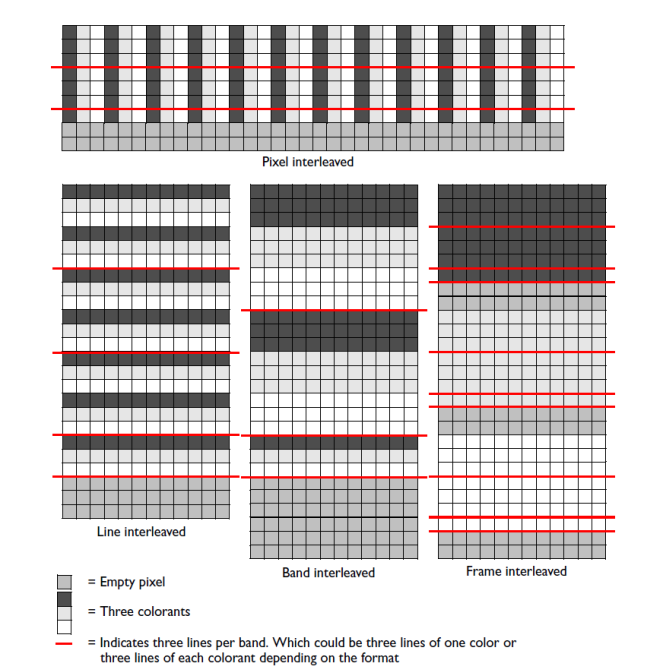
Figure: Color raster interleaving
Each section of Figure: Color raster interleaving depicts multiple concatenated bands containing the same amount of image data: 252 small squares representing 7 lines x 12 pixels x 3 color channels. (The band‐interleaved section is incomplete: the dotted lines at the bottom of the section indicate data rows that are unused in the image. See (v13) Band-interleaved and line-interleaved output for details.) Each small square represents one color channel of one pixel, with each shade of gray (including white) representing a different channel.
The different arrangement for pixel‐interleaved data emphasizes the way in which the data corresponds to the lines in the final image. (v13) Pixel-interleaved data , (v13) Band-interleaved and line-interleaved output and (v13) Frame-interleaved output discuss this in more detail.
Note: For Monochrome (separated) bands all the data is contiguous because there is only one colorant.
colorType_general as follows:
numChannels = 1
rasterDepth = 1, 8 or 16
interleavingStyle = interleavingStyle_mono