
Introduction
If you are developing in C++ or C# using Visual Studio, you may find these project templates useful. You can create new Mako projects with pre-included boilerplate code to save time on repetitive coding. For example, here is the boilerplate code for the Mako C++ Create PDF template.
It creates all necessary objects for a Mako document, indicating where to add custom code. This is saved as a PDF, but you can choose another format if preferred.
How to use
Chose the templates you want to use and download the zip files to your computer. You will then need to navigate to your designated project templates folder for Visual Studio. The default location for this should be: %USERPROFILE%\Documents\Visual Studio 2022\Templates\ProjectTemplates.
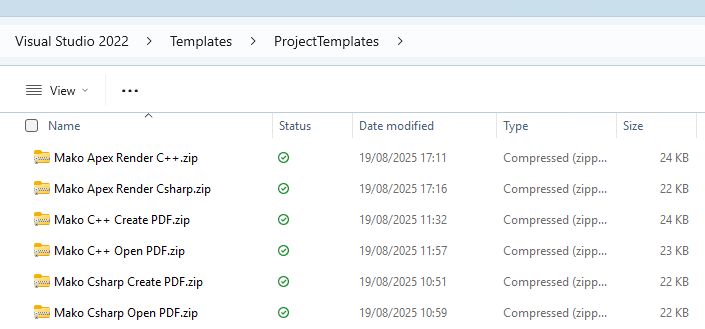
Simply add the zip files to this folder, without unzipping. The templates are then visible as an option when creating a new project in Visual Studio.
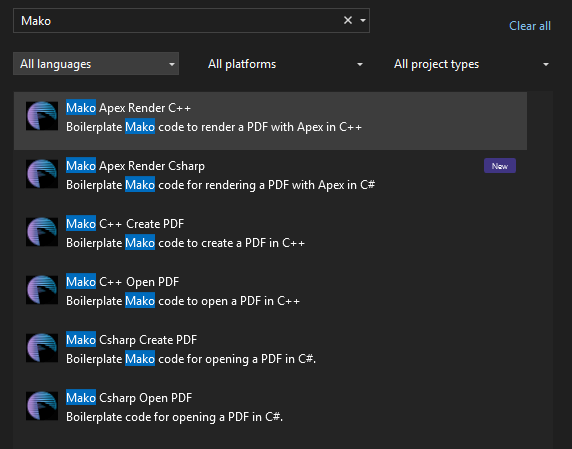
Once you have created a new project, just add the NuGet Packages you need and you are good to go. See Using NuGet packages for more details.
Template files
|
|
C++ |
C# |
|---|---|---|
|
Create a PDF |
||
|
Open a PDF |
||
|
Rendering with Apex (Apex customers only) |