
MISLink (swf_mis_link) Workflow Overview
MISLink is a workflow called swf_mis_link, built on Hybrid Software’s Cloudflow system.
It is designed to support OEM and MIS integrations, allowing developers to create their own custom integrations. The standard swf_mis_link workflow supports receiving a JDF either through HTTP or by dropping it into a hotfolder.
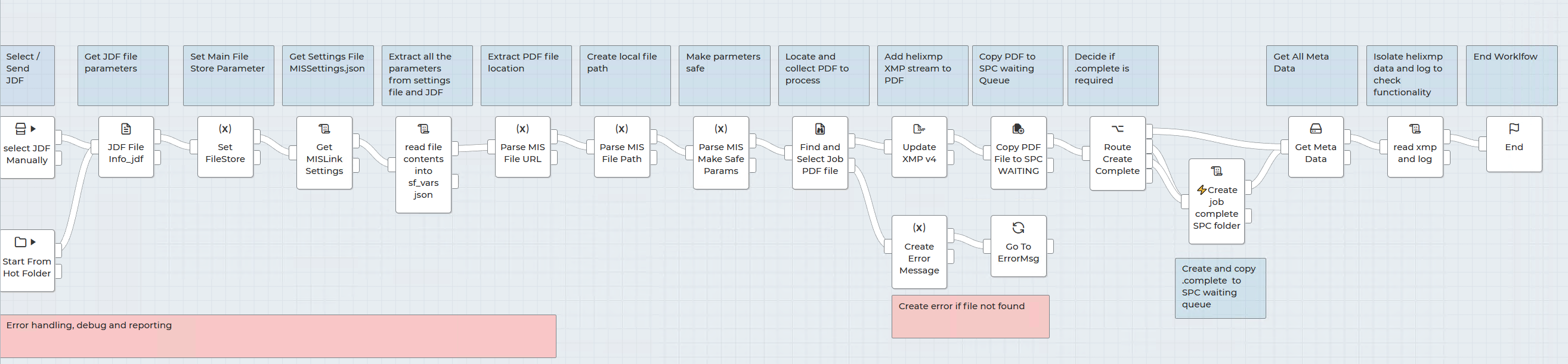
The workflow consumes the JDF and, using a configuration file called MISLinkSettings.json, parses key reference data from the JDF produced by the MIS. It also uses this settings file to remap file locations defined in the MIS JDF to the location of the PDF as seen from the server running Cloudflow.
Once the path mapping is resolved, the workflow copies the PDF reference from the JDF into the Cloudflow system for processing.
Configuration File Location
The settings file is stored in the Cloudflow file store at:
PP_FILE_STORE/swf_mis_link/Resources/
The main configuration file is:
MISLinkSettings.json
Example MISLinkSettings.json
{
  "Input": {
    "fileParam": "files",
    "fileIndex": 0
  },
  "Extraction": {
    "attributes": [
      { "outputKey": "ProjectID", "tag": "JDF", "attr": "ProjectID", "required": false },
      { "outputKey": "JobID", "tag": "JDF", "attr": "JobID", "required": false },
      { "outputKey": "JobPartID", "tag": "JDF", "attr": "JobPartID", "required": false },
      { "outputKey": "DescriptiveName", "tag": "JDF", "attr": "DescriptiveName", "required": false },
      { "outputKey": "CustomerJobName", "tag": "CustomerInfo", "attr": "CustomerJobName", "required": false },
      { "outputKey": "CustomerID", "tag": "CustomerInfo", "attr": "CustomerOrderID", "required": false },
      { "outputKey": "CopyCount", "tag": "crm:LaneRepeat", "attr": "Copies", "required": false, "multi": true },
      { "outputKey": "Media", "tag": "MediaIntent", "attr": "Substrate", "required": false },
      { "outputKey": "StudioFile", "tag": "Assembly", "attr": "ID", "required": false },
      { "outputKey": "CustomerName", "tag": "Company", "attr": "OrganizationName", "required": false },
      { "outputKey": "CustomerAddress1", "tag": "Address", "attr": "Street", "required": false },
      { "outputKey": "CustomerAddress2", "tag": "Address", "attr": "City", "required": false },
      { "outputKey": "CustomerAddress3", "tag": "Address", "attr": "Country", "required": false },
      { "outputKey": "CustomerAddressCode", "tag": "Address", "attr": "PostalCode", "required": false }
    ],
    "fileSpec": {
      "enabled": true,
      "tag": "FileSpec",
      "urlAttr": "URL",
      "outputPathKey": "FilePath",
      "outputNameKey": "FileName"
    }
  },
  "RegexOptions": {
    "allowSingleQuotes": true,
    "allowNamespacePrefix": true
  },
  "Output": {
    "variableContainer": "sf_vars"
  },
  "context": {
    "oem_brand": "dfe_smart"
  },
  "Setup_Paths": {
    "Filestore": "PP_FILE_STORE",
    "MIS_Root": "cloudflow://PP_FILE_STORE/",
    "POC_config": "cloudflow://PP_FILE_STORE/swf_mis_link/Resources/printrun.config",
    "OutputTargetPath": "cloudflow://PP_FILE_STORE/swf_mis_link/Resources/",
    "CreateComplete": "yes",
    "theme": "cloudflow://PP_FILE_STORE/swf_mis_link/_styles/smart_dfe.css"
  },
  "InfoPanel": {
    "Custom1": "Powered by HYSG",
    "Custom2": "Building 2030",
    "Custom3": "Cambourne",
    "Custom4": "CB23 6DW"
  }
}
How MISLinkSettings.json Works
The MISLinkSettings.json file controls how the swf_mis_link workflow extracts information from the incoming JDF, maps file paths, and prepares the PDF for downstream processing.
Input
The Input section defines how the incoming file is received by the workflow.
In the example:
-
fileParamis set tofiles -
fileIndexis set to0
This tells the workflow which incoming file parameter to use and which file in that list should be processed.
Extraction
The Extraction section defines which values are read from the incoming JDF/XML file.
Each attribute entry contains:
-
outputKey— the internal MISLink parameter name -
tag— the XML tag in the JDF where the value is found -
attr— the attribute within that tag to extract -
required— whether the field must be present -
multi— used where multiple values may exist
Important editing rule:
The outputKey is the internal parameter name used by the workflow and should not normally be changed.
The tag and attr values are the references to the data inside the MIS-generated JDF/XML. These should be changed as needed to match the structure of the MIS being connected.
This means MISLink can be adapted to work with different MIS systems by changing how the data is extracted, while keeping the internal workflow parameter names consistent.
For example:
{ "outputKey": "CustomerJobName", "tag": "CustomerInfo", "attr": "CustomerJobName", "required": false }
This means that MISLink stores the value internally as CustomerJobName, looks for the CustomerInfo tag, and extracts the CustomerJobName attribute from that tag.
The sample configuration provided is based on a JDF produced by CERM, but it can easily be adapted to extract equivalent data stored under different parameter names in other MIS-generated JDF files.
FileSpec
The fileSpec section defines how MISLink finds the PDF reference inside the JDF.
In the example:
-
enabledistrue -
tagisFileSpec -
urlAttrisURL -
outputPathKeyisFilePath -
outputNameKeyisFileName
This section tells the workflow where to find the path to the PDF that the MIS expects to be printed.
In this example, the workflow looks for the FileSpec tag, reads the URL attribute, stores the path in FilePath, and stores the filename in FileName.
This is the mechanism used to identify the source PDF before the file location is remapped for Cloudflow access.
RegexOptions
The RegexOptions section controls how flexible the parser is when reading the JDF/XML.
In the example:
-
allowSingleQuotesistrue -
allowNamespacePrefixistrue
This allows the parser to work with slight differences in XML formatting, such as namespace prefixes and the use of single quotes.
Output
The Output section contains the variableContainer setting:
"Output": {
  "variableContainer": "sf_vars"
}
This is an internal storage container used by the workflow to compile the extracted variables.
This should not be changed unless you are developing your own parser or deliberately modifying the workflow internals.
Context
The context section is used for workflow-specific settings, such as branding or OEM-specific behaviour.
In the example:
"context": {
  "oem_brand": "dfe_smart"
}
This identifies the OEM or workflow context in which the data will be used.
Setup_Paths
The Setup_Paths section controls the main storage and path configuration used by MISLink.
Filestore
"Filestore": "PP_FILE_STORE"
This is the main Cloudflow file store.
MIS_Root
"MIS_Root": "cloudflow://PP_FILE_STORE/"
This is the Cloudflow root path to the main PDF server.
It is used when remapping the PDF location from the path referenced in the MIS JDF to a path that Cloudflow can access.
POC_config
"POC_config": "cloudflow://PP_FILE_STORE/swf_mis_link/Resources/printrun.config"
This is historically the printer configuration used by the SPC for legacy workflows.
It is currently not required, but may still exist for backwards compatibility.
OutputTargetPath
"OutputTargetPath": "cloudflow://PP_FILE_STORE/swf_mis_link/Resources/"
This is the destination folder where the PDF, after being retrieved from the main server and enriched with embedded XMP metadata, will be copied.
This should normally be the same folder configured as the SPC waiting queue.
CreateComplete
"CreateComplete": "yes"
This controls whether a .complete file is created.
When dropping files into the SPC waiting queue, this is required so that the SPC knows the PDF has finished copying and that it is safe to add the job to the SPC queue.
Theme
"theme": "cloudflow://PP_FILE_STORE/swf_mis_link/_styles/smart_dfe.css"
This allows Cloudflow to be styled so that it more closely matches an existing system or customer environment.
InfoPanel
The InfoPanel section is used to define static values that can be passed through for display or downstream processing.
In the example:
-
Custom1: Powered by HYSG -
Custom2: Building 2030 -
Custom3: Cambourne -
Custom4: CB23 6DW
These fields can be used for fixed customer-specific or site-specific values, such as branding, address information, reference text, or static production notes.
Workflow Processing
Once all required information has been parsed from the JDF and combined with the values from the settings file, the data is embedded into the PDF as XMP metadata using Stream HelixMP.
This means the PDF now contains all relevant MIS parameters within the file itself.
The PDF is then copied to the waiting queue location for the SPC. After the copy is complete, a .complete file is created if enabled. This file contains selected references that can be used by the SPC and signals that the file transfer has completed.
Downstream Usage
Because the PDF has all required parameters embedded inside it, that information can also be read by other processes, such as Label Studio.
For example, a job could be created from this PDF based on the embedded metadata. If the job contains an information panel such as Lead In / Lead Out, this data can be used to populate the reference files automatically.
If the MIS is aware of SmartDFE, it is also possible to embed a process or .studio name. If the referenced .studio file exists, it can be used to prepare the PDF accordingly.
The embedded information can also include:
-
the media the job should run on
-
the number of copies required
Key Editing Rules
Values that should normally remain unchanged:
-
outputKey -
variableContainer -
internal output structure
Values that may need changing for each MIS integration:
-
tag -
attr -
fileSpecsettings -
MIS_Root -
OutputTargetPath -
InfoPanelvalues
Summary
MISLink provides a flexible way to ingest MIS-generated JDF files, extract and map key job data, locate the associated PDF, and embed production metadata directly into the PDF for use by Cloudflow, SmartDFE SPC, and related downstream systems.
The sample MISLinkSettings.json file is intended as a template. The internal output parameter names should remain consistent, while the XML tag and attribute mappings should be updated to match the JDF structure produced by the target MIS.