
RELEASED APRIL 7TH, 2026
Introduction
Mako 8.4.0 is a maintenance-focused release that delivers important improvements to stability, performance, and rendering accuracy, while continuing to lay the groundwork for future innovation across the platform.
A key area of progress in this release is the development of Apex PDF Output, which is now available as a beta to selected customers for evaluation and testing. This capability represents a significant step forward in how Mako generates PDF content, enabling much faster and more efficient workflows.
A new output class to write PWG (Printer Working Group) raster directly from any Mako-supported PDL (PDF, PCL, XPS etc.) is introduced in this release. The combination of Mako’s abilities to modify jobs, for example imposing for booklet printing, offers a powerful solution to support driverless workflows in enterprise print. Another format common to these workflows is PCLm, a PDF-based wrapped-raster format that is already supported by Mako. New sample code is available to show how to do this in the most efficient way.
A significant number of fixes have been implemented to resolve customer-reported issues and regressions. These include corrections for rendering errors, stability issues, and edge cases affecting PDF and PostScript processing.
New Features
MAKO-5454 Apex performance feature: Multi-threaded PDF output
This is an entirely new implementation of the IPDFOutputclass, which is used to write a Mako document assembly to PDF. We have focused on performance, using a threading pattern to process multiple pages simultaneously, and address bottlenecks such as flate compression of images and content with a multi-threaded approach.
This feature is currently in beta and not generally available. (It will be available in the next release of Mako, in June 2026). In the meantime, those interested in trying it out should contact Hybrid Software Helix to join the beta program.
MAKO-5556 PWG Raster output class
The progression towards driverless printing continues unabated, with Microsoft officially now blocking new V3/V4 driver submissions to Windows Update, and prioritizing Microsoft IPP drivers over third-party legacy drivers. These shifts are designed to encourage the use of the Microsoft IPP Class Driver for better security.
To help meet this need, Mako now features a raster output class for PWG (Printer Working Group) format. Use the Apex renderer (preferred, for performance) to generate page rasters that are written to a multi-page PWG file. What’s great about this approach is ability to leverage the power of the Mako DOM to impose or otherwise prepare the content before being finally output.
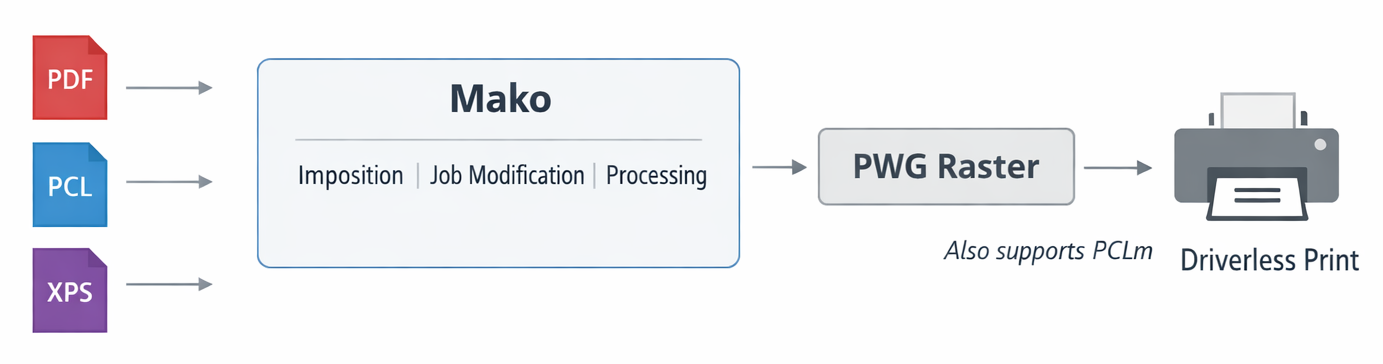
You can try this for yourself with the standard example makoconverter, which now supports .pwg as recognized output file extension.
Mako also supports PCLm, a PDF-based wrapped-raster format. The new IPDFOutput class enables Apex-rendered page rasters to be written as compressed images into a PDF without a copy operation, an ideal method for generating PCLm.
MAKO-5541 Apex: Improve shading patterns in 8-bit rendering
Sometimes, 8 bits per channel isn’t enough to show smooth results, especially when multiple color conversions occur, tone mapping is used, or when there are light or long shading patterns. 256 levels per channel can result in visible stepping in a number of situations.
This change adds dithering to Apex in two scenarios:
-
To improve the appearance of shading patterns (any type, not just linear)
-
When down converting to 8 bit when using 16-bit internal rendering
This feature is enabled through a new CRenderSpecentry:
-
ditherShadingPatterns(bool)
The default is false.
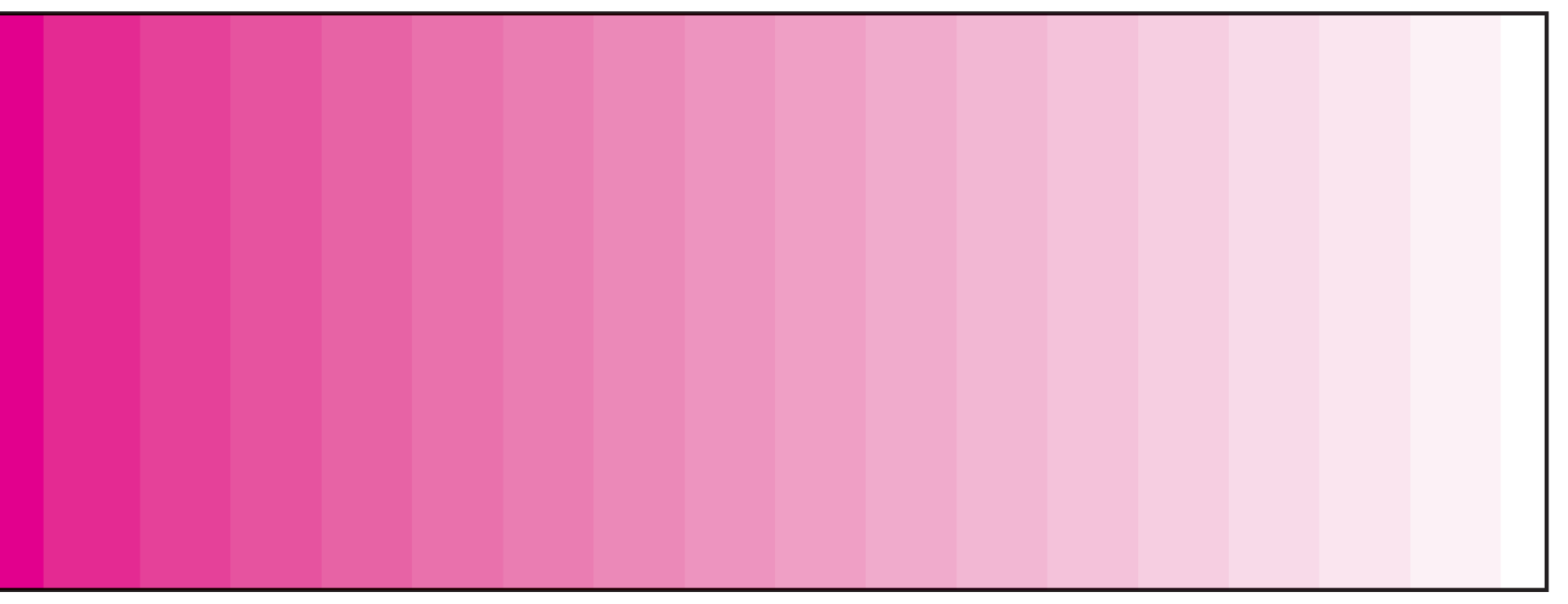
The effect of dithering can be seen here. To exaggerate the effect, the tonal range has been artificially compressed with the Levels control in Photoshop.

MAKO-5596 Apex: Investigate slowdown when using 16-bit internal rendering
Some refactoring in the Apex implementation massively improved this use case and offers an overall performance improvement in Apex rendering.
MAKO-5613 Provide a custom image type for Mako
A new image class, IDOMCustomImage, is introduced in this release. It enables a Mako developer to implement an image compressor / decompressor for a format that Mako does not directly support, such as BMP. It can also provide image data from a frame buffer rendered by Apex, in a form that is ready to use elsewhere without the need to copy data. IDOMCustomImagerequires the implementation of two classes inheriting from the following:
-
IDOMCustomImage::ICustomImageData- This class references the image data and its attributes and creates the ICustomImageFrame that provides access to the image data -
IDOMCustomImage::ICustomImageFrame- This class provides the interface that provides access to the image data
Sample code is provided in the SDK (look for customimage.cpp in simpleexamples, found in the makoapps folder of the distribution).
An implementation of BMP encoding will shortly be available in GitHub.
MAKO-5633 Identify which current macOS Vulkan SDKs don't work with Apex
An issue identified with MoltenVK, the interface layer between the Vulkan API and Apple’s Metal, interferes with the normal operation of Apex. The effect usually occurs at higher rendering resolutions, when Apex’s internal tiling mechanism is activated. The effect on the output varies but will often exhibit as an area of the render in an incorrect position in the output raster, or missing altogether.
At the time of writing, the latest Apex-compatible version of the Vulkan SDK for macOS is 1.4.313.1 (26 May 2025). This means that 1.4.321.0, 1.4.328.1, 1.4.335.1 & 1.4.341.1cannot be used.
MAKO-5578 Fix error in Apex default rendering intent handling
This was noticed when rendering some XPS test files; the Jaws output was darker than Apex. Now fixed.
MAKO-5648 Bad result when rendering with Apex to a framebuffer
When rendering to a framebuffer with an alpha channel, the output was incorrect. Now fixed.
Customer issues
MAKO-5586 MAKOSUP-11738 Mako coverage / transform crash
Added a workaround for a bad font, rather than throw an error.
MAKO-5609 MAKOSUP-11745 Mako ignores PostScript orientation when rendering to PDF/JPG
To solve this issue, a new API is added in Mako 8.4.0 that makes it possible to configure an underlying PDL input class when using IPRNInput. It is described in this knowledgebase article.
MAKO-5611 MAKOSUP-11757 Definition of pdfObj2IPDFDictionary triggers “Unused Function” compiler warning
The lack of an inline keyword triggered an irritating compiler warning. Now fixed.
MAKO-5643 MAKOSUP-11759 Crash seen on Win servers 2019, 2022, 2025
This required a fix to an obscure bug in the Type42 (TrueType) font interpreter.
MAKO-5646 MAKOSUP-11769 Add vector flattening support to IOverprintSimulationTransform
This transform modifies DOM such that any overprint present will be visible when written or rendered in an environment that does not support overprint.
An additional API, setUseVectorFlattener(), is added to allow the generation of vectors rather than rasters, should the overprint transform need to render sections of the page. This can improve the quality, but may result in many more objects being added to the page DOM.
MAKO-5656 MAKOSUP-11761 PS-PDF conversion generates incorrect glyphs when DynaFont is used
The solution to this reported customer problem was to fix several issues related to PostScript “rearranged” fonts. Rearranged fonts are a little-used, legacy feature to produce the effect of multiple versions of the same original (template) font, to save space.
MAKO-5661 MAKOSUP-11743 Large PDF file fails: Error opening input stream
The customer was attempting to process their file with JAVA code. The error was caused by the SWIG wrapper using a 32-bit integer (int) for the stream offset, and the file size meant this limit was exceeded. A 64-bit integer (long) is now used, and the file can be processed normally.
Distribution
Windows VS2019 builds deprecated: Although Mako libraries built for Visual Studio 2019 (V142 build tools) will continue to be available, we recommend you switch to the new Mako libraries built for Visual Studio 2022 (V143 build tools). The VS2019 builds will be removed some time in 2026.
Mako is distributed in a folder labelled MakoSDK that you will find in your support FTP folder. If you have access to Apex, there will be a second folder labelled MakoApexSDK. Obviously, the latter should be used for Apex-related development, but in other respects the Apex release is identical to the Jaws release and can be used for non-Apex development too.
Mako Version 8.4.0 is built for the following platforms:
Apple:
-
iOS (iOS 6.0 and later)
-
macOS (universal binary - x86-64 & ARM64, macOS 11 (Big Sur) and later)
GNU / glibc–based Linux:
-
Ubuntu 24.04 LTS
-
Mint 22.2
-
Debian Bookworm
-
Red Hat Enterprise v8.4
-
CentOS8
-
Debian Bookworm (arm32v7 for Raspberry Pi)
-
Debian Bookworm (arm64v8 for Raspberry Pi)
musl-based Linux:
-
Alpine Linux v3.17.10
Windows platforms:
-
Windows (static and dynamic libs, VS 2022 (V143), x64 and ARM64)
-
Windows (static and dynamic libs, VS 2019 (V142), x64 and x86)
-
Found in
Windows_VS2019folder
-
Android:
-
The Android build is excluded from this release. Contact Mako support if you need Mako for Android.
Mako supports the following programming languages.
-
C++ (Mako is written in C++)
-
C# (.NET Core (multiple platforms) and .NET Framework (Windows only))
-
Java (built with OpenJDK11 and therefore compatible with later versions)
-
Python
The alternatives to C++ are built using SWIG (http://www.swig.org ) which provides a translation to the native libraries. They are found in these distribution folders, found in the SWIG folder:
-
Linux_GNU_SWIG_(C#-Java-Python)
-
Linux_Alpine_SWIG_(C#-Java-Python) – Alpine v3.17
-
Linux_Centos8_SWIG_(C#-Java-Python)
-
Linux_Ubuntu_SWIG_(C#-Java-Python)
-
macOS_SWIG_(C#-Java-Python)
-
Windows_SWIG_(C#-Java-Python)
Cross-platform Java build
The folder SWIG/CrossPlatformJAR contains Java builds that combine the implementations for multiple platforms into a single JAR package, thereby simplifying deployment. The folder contains two combinations, one for Windows & Linux and another for Windows, Linux and macOS. A pre-built sample app is included: makoconverter.jar, and additionally for Apex, simpleapexrender.jar.
ColorLogic
MAKO is available with the ColorLogic CMM, supplied by our Hybrid Group sister company, ColorLogic Gmbh. All builds can be found in the ColorLogic folder. C++ builds are available for Windows, macOS and Linux, and there is also a Windows SWIG build for development with C#, Java or Python that use the ColorLogic CMM.
Windows: All Windows C++ ColorLogic builds are VS2022 only (V143 build tools)